From manual Docker/Nginx proxy to Traefik and Ansible: Modernizing my Ghost blog stack in 2026
This blog has run Ghost in Docker since 2020, manually deployed. In 2026 I set the goal to use Traefik as a modern reverse proxy. Learn the first steps with Traefik, Docker and Ghost, and how to automate with Ansible — including domain redirects, TLS certificates, version pinning, and backups.

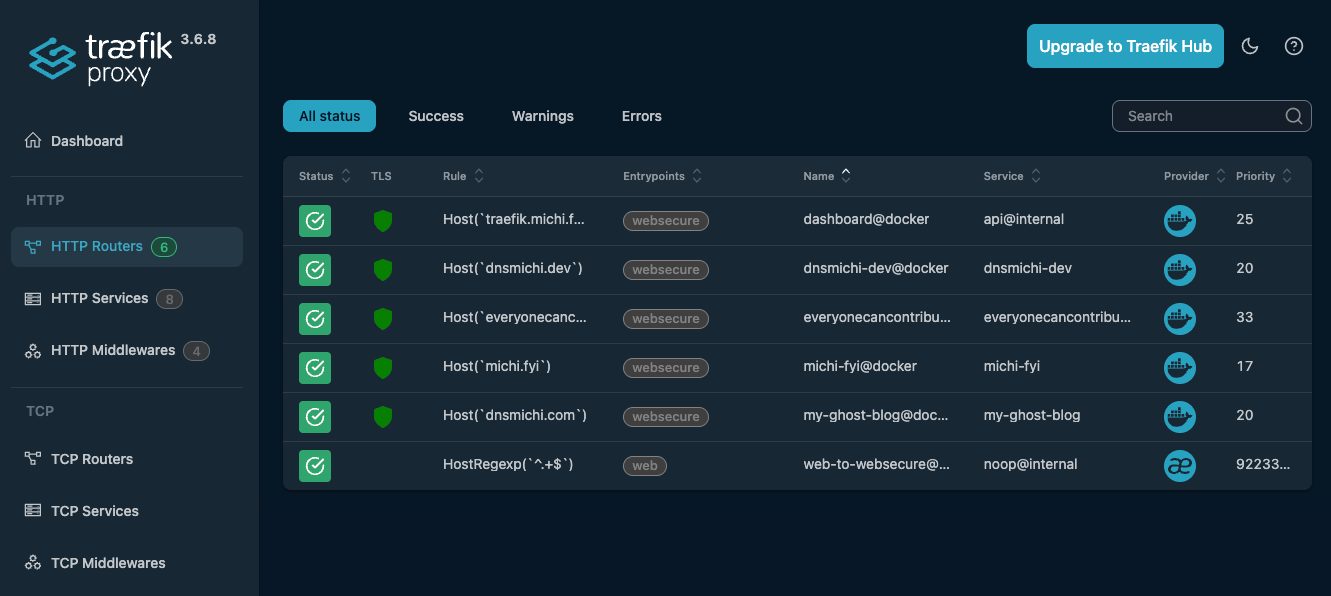
History
Ghost is an open-source CMS that offers a blog with light-weight editing and Markdown formatting, social cards, and more, including a newsletter system. My blog on dnsmichi.at has been running in a Ghost Docker container since March 2020. Back then, I was confident with Docker and NGinx and aimed for a simple setup:
- Ghost setup with unofficial container images from Docker Hub:
ghost-server, NodeJS app,ghost-db, MySQL backend - NGinx HTTP proxy on the Ubuntu system, with Let's Encrypt TLS certificate automation
Problem: No automation and hardened best practices to re-create the setup in case of emergencies.
2026 Goal: Modernize my stack
In 2024, I learned the pros and cons of the NGinx proxy and ACME companion, and after sharing the Umami blog post, folks recommended looking into Traefik as an alternative.
I found new inspiration at Container Days 2025, where I hosted a track featuring the fine folks from Traefik Labs who presented the latest insights into Gateway API. I also knew that Daniel Bodky uses Traefik in their homelab. Along with improving my Ansible skills (LLMs on Embedded talk), I set a goal to put Traefik in production in 2026.
Additional goals: Upgrade Ghost to 6, refine the theme with dark mode and migrate the domain to https://dnsmichi.com/
Getting started with Traefik
Traefik is a cloud-native application reverse proxy that uses service discovery to dynamically configure routing, e.g., to containers running on a host and in Kubernetes. Traefik supports SSL/TLS termination and works with ACME providers like Lets Encrypt to automatically fetch TLS certificates. Everything I need for my Ghost container setup.
For the first steps with Traefik, I followed the official Getting Started guide with Docker and learned how labels in Docker compose services play a big role in Traefik configuration. I started my Traefik-in-production research in the faun.dev() blog to learn how Ghost can run with Traefik as a reverse proxy. Much of my first working iteration is thanks to the detailed explanations in their blog – thank you, Daniel Niecke ✨ I also asked Claude lots of questions and got to success faster with a little help from AI; prompts are documented here.
The next sections describe the setup with Docker Compose as the first learning success. The Ansible-automated version follows afterward in my setup learning iteration.
Readers' note: For simplicity, the domain in configuration examples is blogdomain.com - the production example is this blog dnsmichi.com .
Preparations
Create a new VM in your preferred cloud environment.
Prepare the blogdomain.com DNS records for A (IPv4) and AAAA (IPv6).

My setup uses Ubuntu 24 LTS in Hetzner Cloud, cpx32 host type, Shared Regular Performance (4 CPU, 8GB RAM) provisioned with Terraform/OpenTofu. The VM will also host analytics, observability and CI/CD automation in the future.
SSH into the host, and become root.
sudo -iInstall Docker and Docker compose on host. Example for Ubuntu 24 LTS:
apt update
apt install -y ca-certificates curl

install -m 0755 -d /etc/apt/keyrings
curl -fsSL https://download.docker.com/linux/ubuntu/gpg -o /etc/apt/keyrings/docker.asc
chmod a+r /etc/apt/keyrings/docker.asc

echo \
  "deb [arch=$(dpkg --print-architecture) signed-by=/etc/apt/keyrings/docker.asc] \
  https://download.docker.com/linux/ubuntu \
  $(. /etc/os-release && echo "$VERSION_CODENAME") stable" | \
  tee /etc/apt/sources.list.d/docker.list > /dev/null

apt update

apt install -y docker-ce docker-ce-cli containerd.io docker-buildx-plugin docker-compose-plugin
Verify the setup:
docker --version

# Docker version 29.2.1, build a5c7197

docker compose version

# Docker Compose version v5.0.2
Docker compose configuration
Create the directory /docker/web and docker-compose.yml
mkdir -p /docker/web

touch /docker/web/docker-compose.yaml
Define the container networks:
frontend_netfor web services (Traefik reverse proxy, Ghost server)database_netfor database backend (Ghost server to Ghost DB). Containers are not exposed to reverse proxy.
vim /docker/web/docker-compose.yml---
networks:
frontend_net:
database_net:Traefik in Docker Compose
Edit the docker-compose.yml file and add a new service reverse-proxy.
vim /docker/web/docker-compose.ymlservices:
##############################################################
# Traefik reverse proxy
reverse-proxy:
The latest Traefik version is 3.6 - modify the image tag for your own needs, do not use latest.
image: traefik:v3.6Runtime configuration for Traefik in the command block:
- Configure Docker as provider
--providers.docker, and disable containers exposed as default--providers.docker.exposedByDefault=false(important for later container additions). - The
--entrypoints.weblabels block configures the redirect from port 80 to 443 (https) and its targetwebsecureas entrypoint (see 3. next). --entrypoints.websecure.address=:443runs Traefik on the host's port 443, capturing all incoming HTTPS traffic.--certificatesresolvers.letsencrypt.acmeconfigures Lets Encrypt with an email, and where to persistently store the TLS certificates.- The
storagedirectoryletsencryptis mounted as containervolumes
- The
command:
- "--api.dashboard=true"
- "--api.insecure=false"
- "--accesslog=true"
- "--providers.docker"
- "--providers.docker.exposedByDefault=false"
- "--entrypoints.web.address=:80"
- "--entrypoints.web.http.redirections.entryPoint.to=websecure"
- "--entrypoints.web.http.redirections.entryPoint.scheme=https"
- "--entrypoints.web.http.redirections.entrypoint.permanent=true"
- "--entrypoints.websecure.address=:443"
- "--certificatesresolvers.letsencrypt.acme.tlschallenge=true"
- "--certificatesresolvers.letsencrypt.acme.email=email@domain.com"
- "--certificatesresolvers.letsencrypt.acme.storage=/letsencrypt/acme.json"Additional container configuration:
ports: Maps port 80 and 443 from the host OS to Traefik container.networks: Communicates in thefrontend_netnetwork only.- Add any web frontend services to this network for Traefik service discovery.
volumes: Mount the Docker socket into the container for Traefik to listen on events. Also mount the persisted Lets Encrypt certificates.
ports:
- "80:80"
- "443:443"
networks:
- frontend_net
volumes:
# Traefik can listen to the Docker events
- /var/run/docker.sock:/var/run/docker.sock
- ./letsencrypt:/letsencryptYou can save the configuration (full example in the Appendix) and start it with docker compose up -d. We won't see anything yet, so let's configure the Traefik dashboard first.
Traefik dashboard
The Traefik dashboard can be enabled in the Traefik service using --api.dashboard=true in the command section above.
The Traefik Dashboard can be configured using Docker compose service labels.
- Domain and Vhost: Configure DNS for
traefik.blogdomain.comfirst. - Lets Encrypt certificate using Traefik's ACME Lets Encrypt configuration above.
- Middleware authentication with basic auth.
The Traefik dashboard supports basic auth. Use htpassword from the apache2-utils package on Debian/Ubuntu to generate a password hash, and store the user/password in a password safe like 1Password. The -nB option uses bcrypt, which is supported by Traefik.
apt install apache2-utils
htpasswd -nB admin
# Output: admin:$2y$05$bk2QPMvrAzGAgqzFQkBSPu9DedOgHBRXoJM68IIQTYbTqMW0aWM6qConfigure the service labels and replace traefik.blogdomain.com and the basic auth users admin:$2y... string.
labels:
- "traefik.enable=true"
# Dashboard router
- "traefik.http.routers.dashboard.rule=Host(`traefik.blogdomain.com`)"
- "traefik.http.routers.dashboard.entrypoints=websecure"
- "traefik.http.routers.dashboard.tls=true"
- "traefik.http.routers.dashboard.tls.certresolver=letsencrypt"
- "traefik.http.routers.dashboard.service=api@internal"
- "traefik.http.routers.dashboard.middlewares=dashboard-auth"
# BasicAuth middleware
- "traefik.http.middlewares.dashboard-auth.basicauth.users=admin:$2y$05$bk2QPMvrAzGAgqzFQkBSPu9DedOgHBRXoJM68IIQTYbTqMW0aWM6q"
# Keep the prefix web_ in sync with the deploy target in /docker/web (Ansible)
- "traefik.docker.network=web_frontend_net"Note: The documentation recommends disabling the dashboard and API for production usage. Take a note for later to set --api.dashboard=false .
Start the Docker compose stack:
docker compose up -dNavigate to https://traefik.blogdomain.com and log in using the basic auth credentials.
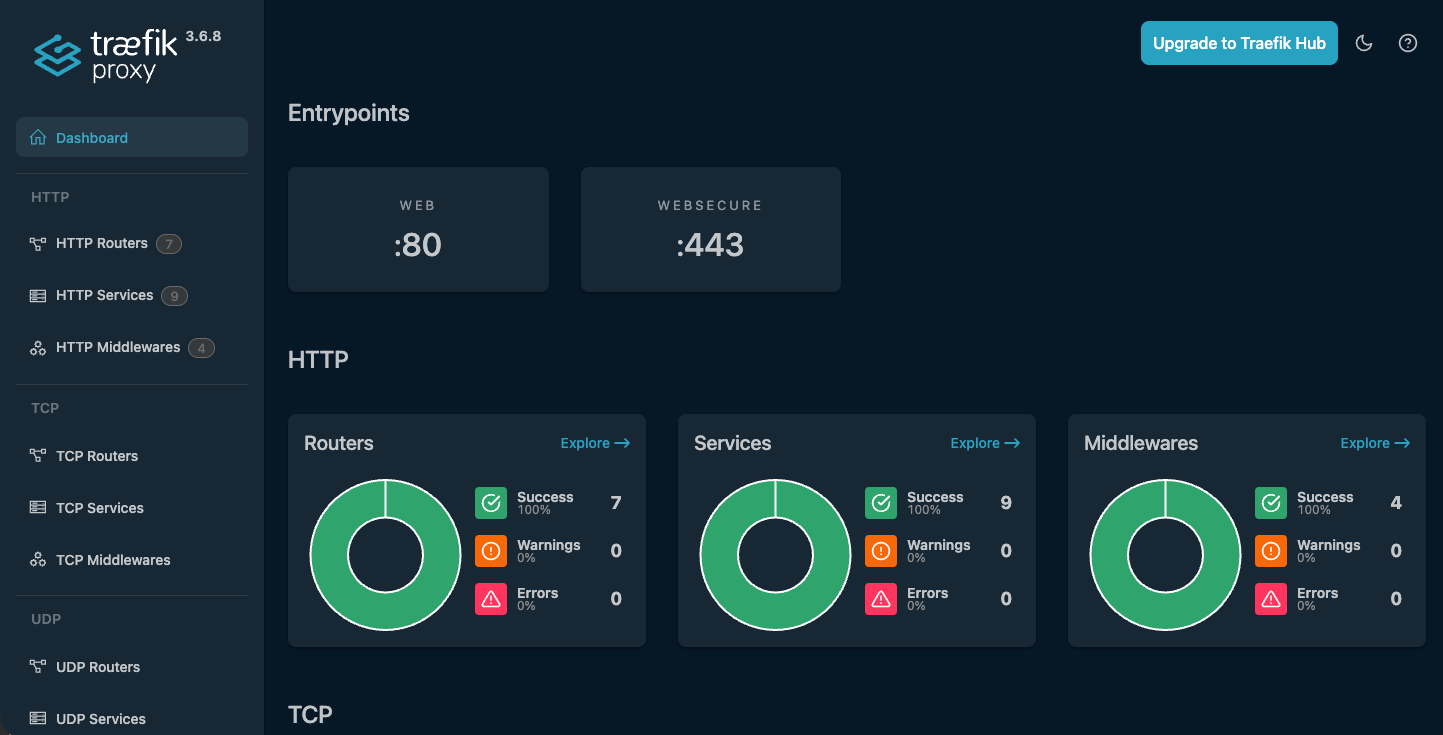
Note: The full docker-compose.yml is available in the Appendix.
Ghost with Traefik in Docker Compose
Ghost requires two services:
- Ghost server, NodeJS app, image on Docker Hub
- MySQL database backend
My configuration is based on the Docker Hub readme, and my own learnings since 2020. Let's transform this configuration working with Traefik.
Ghost server
Add a new service ghost-server and specify the settings. Important notes:
image: The latest Ghost release is 6 where theimageis tagged with. Major versions sometimes break behavior, which is why I prefer tested upgrades with backups. I also learned that Ghost 6 plans to use Docker as default setup.depends_on: Wait until theghost-dbcontainer comes up healthy. Ghost performs database migrations on startup which would otherwise fail.volumes: Mount/docker/web/ghost/contentinto the container as persistent volume.networks: Specifydatabase_netfor communication with theghost-dbcontainer, andfrontend_netfor Traefik as reverse proxy.- Important: Do not expose
ports- Traefik discovers the port through thefrontend_netnetwork.
- Important: Do not expose
labels: Define theblogdomainhost for TLS only (websecure) and Lets Encrypt TLS certificate fetch, set the Ghost port discovery explicitely, and define thefrontend_netnetwork for Traefik.
# /docker/web/docker-compose.yml
services:
# ...
##############################################################
# Ghost
ghost-server:
image: ghost:6
restart: always
env_file: ".ghost.env"
depends_on:
ghost-db:
condition: service_healthy
volumes:
- /docker/web/ghost/content:/var/lib/ghost/content
networks:
# Talk to backend database
- database_net
# Frontend is exposed to Traefik
- frontend_net
labels:
- "traefik.enable=true"
- "traefik.http.routers.my-ghost-blog.rule=Host(`blogdomain.com`)"
- "traefik.http.routers.my-ghost-blog.entrypoints=websecure"
- "traefik.http.routers.my-ghost-blog.tls=true"
# Keep this linked to Traefik label certificatesresolvers name.
- "traefik.http.routers.my-ghost-blog.tls.certresolver=letsencrypt"
- "traefik.http.routers.my-ghost-blog.tls.domains[0].main=blogdomain.com"
# Explicitely point to Ghost port
- "traefik.http.services.my-ghost-blog.loadbalancer.server.port=2368"
# Keep the prefix web_ in sync with the deploy target in /docker/web (Ansible)
- "traefik.docker.network=web_frontend_net"Note: Docker compose automatically adds the directory web/ as a prefix to all Docker settings, hence networks: frontend_net becomes traefik.docker.network=web_frontend_net as labels entry.
Ghost database (MySQL)
Ghost needs a MySQL 8 database container named ghost-db. This is also the database hostname in the .ghost.env configuration (see next section).
image: Ghost works best with MySQL 8 or compatible services. My latest tested MySQL version is 8.4. I only gradually upgrade the backend because I keep running into breaking changes in X.Y versions.volumes: Mount the MySQL database storage from/docker/web/ghost/mysql.networks: The network is limited todatabase_net- Traefik service discovery is disabled in the
labelswithtraefik.enable=false. This mitigates the risk of accidentally exposing the database port 3306 to the web.
- Traefik service discovery is disabled in the
healthcheck: The Ghost server depends on the MySQL database container; therefore, an additional health check is added to ensure the database is up and running before the Ghost app tries to connect/run database migrations.
# /docker/web/docker-compose.yml
services:
# ...
# https://ghost.org/docs/faq/supported-databases/
ghost-db:
image: mysql:8.4
restart: always
env_file: ".ghost.env"
volumes:
- /docker/web/ghost/mysql:/var/lib/mysql
networks:
# Limit to database backend only
- database_net
healthcheck:
test: ["CMD", "mysqladmin" ,"ping", "-h", "localhost"]
interval: 1s
timeout: 20s
retries: 10
start_period: 10s
labels:
- "traefik.enable=false"Credentials and config in .ghost.env
By default, the Ghost and MySQL containers expect credentials and configuration as environment variables. Create a .ghost.env file in /docker/web/ and limit its permission to root read-write only (0600).
The configuration file also includes the url parameter for the Ghost server, which needs to be prefixed with https://.
vim /docker/web/.ghost.env# /docker/web/.ghost.env
# ghost server
url=https://blogdomain.com
database__client=mysql
# This needs to be in sync with docker-compose host name.
database__connection__host=ghost-db
database__connection__user=root
database__connection__password=CHANGEMESUPERSECRET
database__connection__database=ghost
security__staffDeviceVerification=false
# ghost-db server
MYSQL_ROOT_PASSWORD=CHANGEMESUPERSECRETEnsure that the .ghost.env file is referenced in the docker-compose.yml services definition:
# /docker/web/docker-compose.yml
services:
# ...
ghost-server:
# ...
env_file: ".ghost.env"
ghost-db:
# ...
env_file: ".ghost.env"Restart Docker compose and verify
docker compose pull
docker compose up -d
curl -Lvv blogdomain.com Note: The full docker-compose.yml is available in the Appendix.
Results: Ghost with Traefik in Docker
Open blogdomain.com in your browser and start building your Ghost blog.
You can verify the setup in the Traefik dashboard with the HTTP services; search for blogdomain.com.
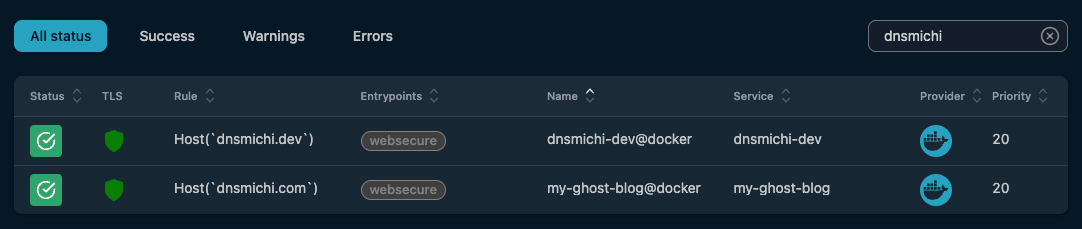
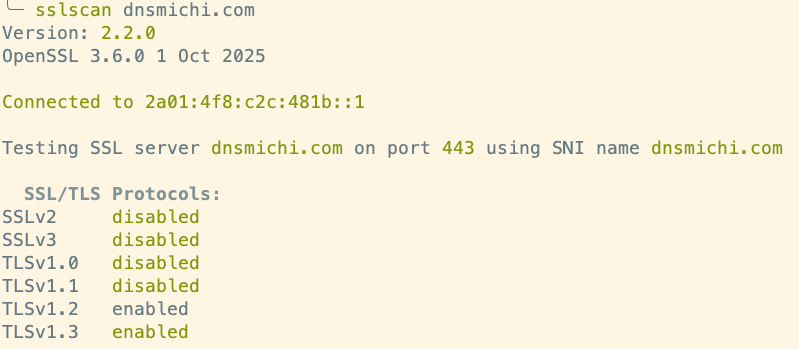
Inspect the TLS certificates with sslscan and other tools.
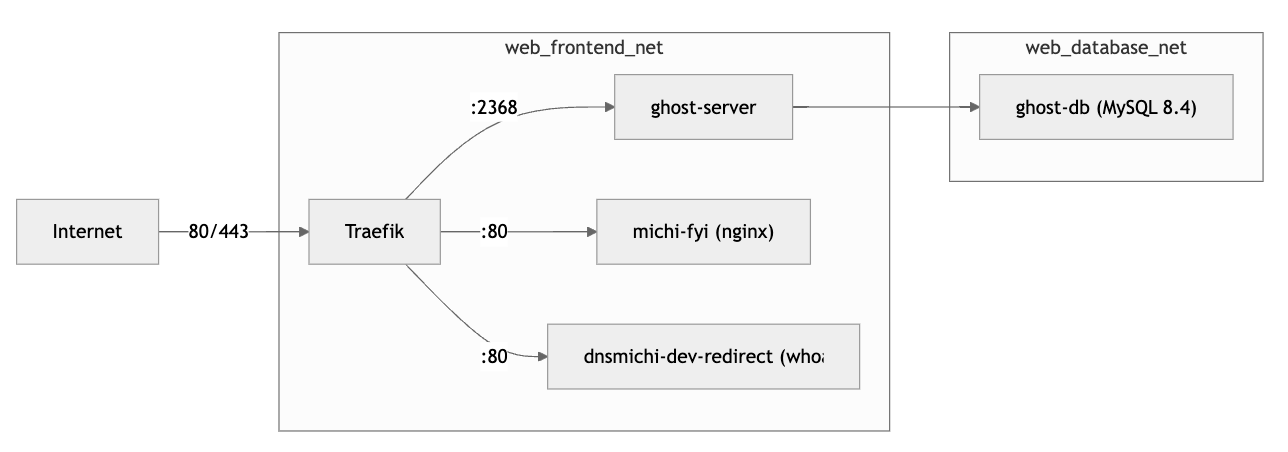
The architecture flow with Docker networks and Traefik looks like this:
Need more automation and security? This blog on https://dnsmichi.com/ uses the Ansible automation documented below.
First steps with Ghost: Settings
Log into blogdomain.com/ghost and open the settings. I kept the changes minimal for dnsmichi.com.
- Site:
- Design & Branding: Publication cover, Typography (dnsmichi.com: Inter).
- Theme: Casper (default, on dnsmichi.com)
- Navigation: Primary menu
- Advanced
- Code inspections: A side TOC menu and code block highlights (source, dnsmichi.com assets here)
Migrating from an existing Ghost setup
See my documented steps in the Appendix describing the Ghost-in-Docker migration from dnsmichi.at to dnsmichi.com (2 VMs).
Optional: Redirects with Traefik
Redirecting an HTTP(S) request usually requires a minimal web server container and configuration. Fortunately, Traefik thought of that:
- Redirects configured as labels
- Minimal Traefik runtime that performs the redirect operations:
traefik/whoami
Benefit: Saves the workload and configuration of an NGinx container.
The following example redirects https://dnsmichi.dev to https://dnsmichi.com/about/. I registered the domain for my Bluesky handle and needed a "who am i" web host. It configures TLS as default, with Lets Encrypt certificate fetch, and the permanent redirect.
# /docker/web/docker-compose.yml
services:
# ...
##############################################################
# dnsmichi.dev redirect to dnsmichi.com/about
dnsmichi-dev-redirect:
image: traefik/whoami
restart: always
networks:
- frontend_net
labels:
- "traefik.enable=true"
- "traefik.http.routers.dnsmichi-dev.rule=Host(`dnsmichi.dev`)"
- "traefik.http.routers.dnsmichi-dev.entrypoints=websecure"
- "traefik.http.routers.dnsmichi-dev.tls=true"
- "traefik.http.routers.dnsmichi-dev.tls.certresolver=letsencrypt"
- "traefik.http.routers.dnsmichi-dev.middlewares=dnsmichi-dev-redir"
- "traefik.http.middlewares.dnsmichi-dev-redir.redirectregex.regex=.*"
- "traefik.http.middlewares.dnsmichi-dev-redir.redirectregex.replacement=https://dnsmichi.com/about"
- "traefik.http.middlewares.dnsmichi-dev-redir.redirectregex.permanent=true"
- "traefik.http.services.dnsmichi-dev.loadbalancer.server.port=80"
- "traefik.docker.network=web_frontend_net"Note: Docker compose automatically adds the directory web/ as a prefix to all Docker settings, hence networks: frontend_net becomes traefik.docker.network=web_frontend_net as labels entry.
Automation with Ansible
This section aims to fully automate the configuration and deployment of Traefik with Ghost in Docker using Ansible. It is documented separately, as I first learned the manual setup with Traefik and then developed the Ansible setup.
Changes from manual to automation
It can be helpful to understand the manual setup concepts first. The required changes are:
- Generic Docker compose configuration
- VHosts, ACME emails, etc. managed with Ansible
host_vars, use Jinja templates - Docker image versions managed with
group_vars.
- VHosts, ACME emails, etc. managed with Ansible
.envfiles with root-only permissions (0600)- Secrets managed with Ansible Vault, .env files as Jinja templates
- Base OS hardening, Ops tooling, additional configuration, and Backups
- Managed with Ansible
Ansible environment
Install Ansible on your host, e.g. using Homebrew on macOS:
brew install ansible ansible-lint Initialize the main structure. You can clone/fork my project and modify it for your needs: https://gitlab.com/dnsmichi/automated-michi.fyi-dnsmichi-com or follow the steps below.
I've developed the follow structure from learned best practices:
inventorymanaging the production environment and providinggroup_varswith the Ansible vault and image tag versions.host_varscontains public details like ACME email.playbooksweb.ymlfor preparing the Docker compose environment.base-os.yml,base-upgrade.ymlandbackup-ghost.ymlfor specific host OS packages, firewall/SSH hardening, unattended upgrades and backups.templatesfor provisioning the host target/docker/web/docker-compose.ymlwith Jinja templates.
roles/requirements.ymlspecifying collections and roles.- Configuration files
.ansible.cfgfor Ansible configuration.ansible-lintfor instructions foransible-lintCLI-
.gitignoreignoring cache files, and.vault-passwordandvault.ymlfiles in Git. AGENTS.mdproviding Agentic AI instructions for Ansible
tree -L6 -a
.
├── .ansible-lint
├── .gitignore
├── .vault-password
├── AGENTS.md
├── ansible.cfg
├── inventory
│ ├── group_vars
│ │ └── all
│ │ ├── vars.yml
│ │ └── vault.yml
│ ├── host_vars
│ │ └── blogdomain.yml
│ └── production.yml
├── playbooks
│ ├── backup-ghost.yml
│ ├── base-os.yml
│ ├── base-upgrade.yml
│ ├── templates
│ │ └── docker
│ │ └── web
│ │ ├── docker-compose.yml.j2
│ │ └── run.sh
│ └── web.yml
└── roles
└── requirements.ymlProduction inventory
Specify the Ansible user and SSH private key. The blogdomain host sits in the web_servers group, in case you need group specific variables.
vim inventory/production.yml---
all:
vars:
ansible_user: 'usernameCHANGEME'
ansible_ssh_private_key_file: '~/.ssh/id_ed25519_CHANGEME'
children:
web_servers:
hosts:
blogdomain:Ansible variables: group and host
Group variables manage the container image versions, backup retention times. etc. This configuration intentionally uses the all directory to ensure versions are the same across my stack.
Note: I developed this after hardcoding the image tags in docker-compose first.
Update the versions in the group variables:
mkdir -p inventory/group_vars/all/
vim inventory/group_vars/all/vars.yml# group_vars/all/vars.yml
traefik_version: "v3.6"
ghost_version: "6"
ghost_mysql_version: "8.4"
nginx_version: "1.27-alpine"
# Backup
backup_retention_days: 365Manage VHosts in the host variables:
Replace blogdomain.com as file path with your host domain, and modify the specific variable values in the vars.yml file, too.
mkdir -p inventory/host_vars/blogdomain.com/
vim inventory/host_vars/blogdomain.com/vars.yml# Web
default_vhost: "domain.com"
ghost_vhost: "blogdomain.com"
traefik_vhost: "traefik.blogdomain.com"
acme_default_email: "user@domain.com"
Secrets in Ansible Vault
Secrets in Ansible should be managed with Ansible Vault. Create the vault.yml with ansible-vault .
ansible-vault create inventory/group_vars/all/vault.ymlAdd the Ghost database and Traefik dashboard credentials.
ghost_db_user: "root"
ghost_db_password: "CHANGEMESUPERSECRET"
traefik_dashboard_users: "admin:$2y$05$CHANGEME"Encrypt the vault and store the password in a password safe like 1Password.
You can edit the vault again using the following command:
ansible-vault edit inventory/group_vars/all/vault.ymlTo avoid interactive password questions in the future (e.g. in CI/CD), you can store the vault password in a local file, and configure Ansible to read from it.
echo "your-vault-password" > .vault-password
chmod 600 .vault-passwordansible-playbook playbooks/web.yml --vault-password-file .vault-passwordIf you want to omit the --vault-password-file parameter, edit ansible.cfg and add:
[defaults]
vault_password_file = .vault-passwordAnsible Jinja templates for Docker Compose and .env
Ansible supports Jinja templates with variable placeholders for dynamic file generation on target hosts.
Migrate the existing docker-compose.yml and .ghost.env files into Jinja templates in playbooks/templates/web/docker/ and add the .j2 file suffix.
Replace configuration variables and sensitive credentials with group/host vars and Ansible vault variables using the {{ variable_name }} syntax.
Edit playbooks/templates/web/docker/.ghost.env.j2 to use ghost_vhost, ghost_db_user and ghost_db_password variables.
vim playbooks/templates/web/docker/.ghost.env.j2# ghost server
url=https://{{ ghost_vhost }}
database__client=mysql
# This needs to be in sync with docker-compose host name.
database__connection__host=ghost-db
database__connection__user={{ ghost_db_user }}
database__connection__password={{ ghost_db_password }}
database__connection__database=ghost
security__staffDeviceVerification=false
# ghost-db server
MYSQL_ROOT_PASSWORD={{ ghost_db_password }}All web Docker containers are combined in a single docker-compose.yml file for easier management. Edit playbooks/templates/web/docker/docker-compose.yml.j2 and use the following variables:
- Traefik:
traefik_version,acme_default_email,traefik_vhost,traefik_dashboard_users - Ghost:
ghost_version,ghost_vhost,ghost_mysql_version,
vim playbooks/templates/web/docker/docker-compose.yml.j2---
networks:
frontend_net:
database_net:
services:
##############################################################
# Traefik reverse proxy
reverse-proxy:
image: traefik:{{ traefik_version }}
command:
- "--api.dashboard=true"
- "--api.insecure=false"
- "--accesslog=true"
- "--providers.docker"
- "--providers.docker.exposedByDefault=false"
- "--entrypoints.web.address=:80"
- "--entrypoints.web.http.redirections.entryPoint.to=websecure"
- "--entrypoints.web.http.redirections.entryPoint.scheme=https"
- "--entrypoints.web.http.redirections.entrypoint.permanent=true"
- "--entrypoints.websecure.address=:443"
- "--certificatesresolvers.letsencrypt.acme.tlschallenge=true"
- "--certificatesresolvers.letsencrypt.acme.email={{ acme_default_email }}"
- "--certificatesresolvers.letsencrypt.acme.storage=/letsencrypt/acme.json"
ports:
- "80:80"
- "443:443"
networks:
- frontend_net
volumes:
# Traefik can listen to the Docker events
- /var/run/docker.sock:/var/run/docker.sock
- ./letsencrypt:/letsencrypt
labels:
- "traefik.enable=true"
# Dashboard router
- "traefik.http.routers.dashboard.rule=Host(`{{ traefik_vhost }}`)"
- "traefik.http.routers.dashboard.entrypoints=websecure"
- "traefik.http.routers.dashboard.tls=true"
- "traefik.http.routers.dashboard.tls.certresolver=letsencrypt"
- "traefik.http.routers.dashboard.service=api@internal"
- "traefik.http.routers.dashboard.middlewares=dashboard-auth"
# BasicAuth middleware
- "traefik.http.middlewares.dashboard-auth.basicauth.users={{ traefik_dashboard_users }}"
# Keep the prefix web_ in sync with the deploy target in /docker/web (Ansible)
- "traefik.docker.network=web_frontend_net"
##############################################################
# Ghost
ghost-server:
image: ghost:{{ ghost_version }}
restart: always
env_file: ".ghost.env"
depends_on:
ghost-db:
condition: service_healthy
volumes:
- /docker/web/ghost/content:/var/lib/ghost/content
networks:
# Talk to backend database
- database_net
# Frontend is exposed to Traefik
- frontend_net
labels:
- "traefik.enable=true"
- "traefik.http.routers.my-ghost-blog.rule=Host(`{{ ghost_vhost }}`)"
- "traefik.http.routers.my-ghost-blog.entrypoints=websecure"
- "traefik.http.routers.my-ghost-blog.tls=true"
# Keep this linked to Traefik label certificatesresolvers name.
- "traefik.http.routers.my-ghost-blog.tls.certresolver=letsencrypt"
- "traefik.http.routers.my-ghost-blog.tls.domains[0].main={{ ghost_vhost }}"
# Explicitely point to Ghost port
- "traefik.http.services.my-ghost-blog.loadbalancer.server.port=2368"
# Keep the prefix web_ in sync with the deploy target in /docker/web (Ansible)
- "traefik.docker.network=web_frontend_net"
# https://ghost.org/docs/faq/supported-databases/
ghost-db:
image: mysql:{{ ghost_mysql_version }}
restart: always
env_file: ".ghost.env"
volumes:
- /docker/web/ghost/mysql:/var/lib/mysql
networks:
# Limit to database backend only
- database_net
healthcheck:
test: ["CMD", "mysqladmin" ,"ping", "-h", "localhost"]
interval: 1s
timeout: 20s
retries: 10
start_period: 10s
labels:
- "traefik.enable=false"
There are also more specific use cases for my environment in the production configuration not shown here, for example, redirects.
Optional: Docker compose helper on the host
I use this helper script when SSH'ing on the target host for debugging.
vim playbooks/templates/web/docker/run.sh#!/bin/sh
docker compose pull && docker compose up -d --force-recreate --build
Ansible playbooks
Note: I've created additional playbooks for OS setup, upgrades and backups; you can find them in the Appendix to allow focus on the Docker Compose Traefik/Ghost setup here.
The Ansible playbook playbooks/web.yml prepares the /docker/web path, creates the docker-compose.yml and .ghost.env files from Jinja templates, adds the local run.sh helper, and then deploys the stack with the community.docker.docker_compose_v2 module. When successful, it prints the running containers and image tags.
vim playbooks/web.yml---
- name: Web
hosts: all
remote_user: michi
become: true
become_method: ansible.builtin.sudo
tasks:
# /docker/web - Traefik, Ghost, etc
- name: Create web path
ansible.builtin.file:
path: /docker/web
state: directory
mode: '0750'
- name: Create docker-compose for web
ansible.builtin.template:
src: docker/web/docker-compose.yml.j2
dest: /docker/web/docker-compose.yml
mode: '0600'
- name: Create .env for web - ghost
ansible.builtin.template:
src: docker/web/.ghost.env.j2
dest: /docker/web/.ghost.env
mode: '0600'
# Docker compose helper - for manual SSH
- name: Create compose up recreate script
ansible.builtin.template:
src: docker/web/run.sh
dest: /docker/web/run.sh
mode: '0700'
# Docker compose deployment with Ansible
- name: Deploy web stack
community.docker.docker_compose_v2:
project_src: /docker/web
pull: always
recreate: always
state: present
- name: Check running containers
ansible.builtin.command:
cmd: "{% raw %}docker ps --format 'table {{.Names}}\t{{.Image}}'{% endraw %}"
register: docker_ps
- name: Show containers
ansible.builtin.debug:
var: docker_ps.stdout_lines
Ansible deployment
Deploy everything onto the target host:
ansible-playbook playbooks/web.yml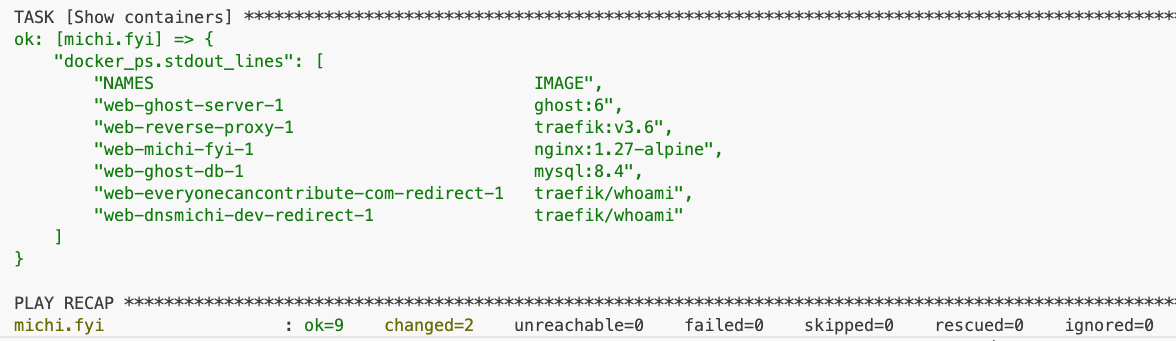
After the Docker containers have started, this is the expected directory structure on the target host:
tree /docker/web -L 2
/docker/web
├── docker-compose.yml
├── ghost
│ ├── content
│ └── mysql
├── .ghost.env
├── letsencrypt
│ └── acme.json
└── run.shIf manual SSH is necessary, use the run.sh helper script while debugging.
ssh user@blogdomain.com
sudo -i
cd /docker/web
./run.sh Upgrade Ghost from 5 to 6
Performed while writing this blog post.
- Investigated the 6.0 changelog and asked Claude about breaking changes. Nothing to worry about.
- Took a backup with the newly created Ansible playbook
playbooks/backup-ghost.yml - Updated
inventory/group_vars/all/vars.ymlwithghost_version: "6" - Ran
ansible-playbook playbooks/web.yml - Verified web and SSH'd into the host:

What's next?
I'm working on future stack upgrades and will share my findings:
- Add an Observability stack with Prometheus and Grafana in Traefik. Production important.
- Automate upgrades with GitLab CI/CD Runner and Ansible.
- Migrate the Umami setup to Traefik - currently down to unblock the initial iteration with Traefik and Ghost. Not production critical, data/containers exist.
Appendix
Full configuration, additional Ansible playbooks, Claude prompts, etc.
The complete Ansible automation is available in this GitLab project: https://gitlab.com/dnsmichi/automated-michi.fyi-dnsmichi-com
CI/CD linting
ansible-lint , secrets detection, and IaC SAST scanning are configured in .gitlab-ci.yml.
Docker Compose - full
/docker/web/docker-compose.yml
---
networks:
  frontend_net:
  database_net:
services:

  ##############################################################
  # Traefik reverse proxy

  reverse-proxy:
image: traefik:v3.6
command:
- "--api.dashboard=false"
- "--api.insecure=false"
- "--accesslog=true"
- "--providers.docker"
- "--providers.docker.exposedByDefault=false"
- "--entrypoints.web.address=:80"
- "--entrypoints.web.http.redirections.entryPoint.to=websecure"
- "--entrypoints.web.http.redirections.entryPoint.scheme=https"
- "--entrypoints.web.http.redirections.entrypoint.permanent=true"
- "--entrypoints.websecure.address=:443"
- "--certificatesresolvers.letsencrypt.acme.tlschallenge=true"
- "--certificatesresolvers.letsencrypt.acme.email=user@domain.com"
- "--certificatesresolvers.letsencrypt.acme.storage=/letsencrypt/acme.json"
    ports:
      - "80:80"
      - "443:443"
    networks:
      - frontend_net
    volumes:
      # Traefik can listen to the Docker events
      - /var/run/docker.sock:/var/run/docker.sock
      - ./letsencrypt:/letsencrypt
    labels:
      - "traefik.enable=true"

      # Dashboard router
      - "traefik.http.routers.dashboard.rule=Host(`traefik.blogdomain.com`)"
      - "traefik.http.routers.dashboard.entrypoints=websecure"
      - "traefik.http.routers.dashboard.tls=true"
      - "traefik.http.routers.dashboard.tls.certresolver=letsencrypt"
      - "traefik.http.routers.dashboard.service=api@internal"
      - "traefik.http.routers.dashboard.middlewares=dashboard-auth"

      # BasicAuth middleware
      - "traefik.http.middlewares.dashboard-auth.basicauth.users=admin:$2y$05$bk2QPMvrAzGAgqzFQkBSPu9DedOgHBRXoJM68IIQTYbTqMW0aWM6q"

      # Keep the prefix web_ in sync with the deploy target in /docker/web (Ansible)
      - "traefik.docker.network=web_frontend_net"
##############################################################
# Ghost
ghost-server:
image: ghost:6
restart: always
env_file: ".ghost.env"
depends_on:
ghost-db:
condition: service_healthy
volumes:
- /docker/web/ghost/content:/var/lib/ghost/content
networks:
# Talk to backend database
- database_net
# Frontend is exposed to Traefik
- frontend_net
labels:
- "traefik.enable=true"
- "traefik.http.routers.my-ghost-blog.rule=Host(`blogdomain.com`)"
- "traefik.http.routers.my-ghost-blog.entrypoints=websecure"
- "traefik.http.routers.my-ghost-blog.tls=true"
# Keep this linked to Traefik label certificatesresolvers name.
- "traefik.http.routers.my-ghost-blog.tls.certresolver=letsencrypt"
- "traefik.http.routers.my-ghost-blog.tls.domains[0].main=blogdomain.com"
# Explicitely point to Ghost port
- "traefik.http.services.my-ghost-blog.loadbalancer.server.port=2368"
# Keep the prefix web_ in sync with the deploy target in /docker/web (Ansible)
- "traefik.docker.network=web_frontend_net"
# https://ghost.org/docs/faq/supported-databases/
ghost-db:
image: mysql:8.4
restart: always
env_file: ".ghost.env"
volumes:
- /docker/web/ghost/mysql:/var/lib/mysql
networks:
# Limit to database backend only
- database_net
healthcheck:
test: ["CMD", "mysqladmin" ,"ping", "-h", "localhost"]
interval: 1s
timeout: 20s
retries: 10
start_period: 10s
labels:
- "traefik.enable=false"
##############################################################
# REDIRECTS
# Use a minimal container image from traefik for this purpose
##############################################################
##############################################################
# dnsmichi.dev redirect to dnsmichi.com/about
dnsmichi-dev-redirect:
image: traefik/whoami
restart: always
networks:
- frontend_net
labels:
- "traefik.enable=true"
- "traefik.http.routers.dnsmichi-dev.rule=Host(`dnsmichi.dev`)"
- "traefik.http.routers.dnsmichi-dev.entrypoints=websecure"
- "traefik.http.routers.dnsmichi-dev.tls=true"
- "traefik.http.routers.dnsmichi-dev.tls.certresolver=letsencrypt"
- "traefik.http.routers.dnsmichi-dev.middlewares=dnsmichi-dev-redir"
- "traefik.http.middlewares.dnsmichi-dev-redir.redirectregex.regex=.*"
- "traefik.http.middlewares.dnsmichi-dev-redir.redirectregex.replacement=https://dnsmichi.com/about"
- "traefik.http.middlewares.dnsmichi-dev-redir.redirectregex.permanent=true"
- "traefik.http.services.dnsmichi-dev.loadbalancer.server.port=80"
# Keep the prefix web_ in sync with the deploy target in /docker/web (Ansible)
- "traefik.docker.network=web_frontend_net"Ansible playbook: Base OS
The goal is to install often required packages, harden the host OS (UFW firewall, SSH) and optimize the logging for UFW (spams syslog by default on Ubuntu).
---
- name: Base OS Setup
  hosts: all
  become: true
  become_method: ansible.builtin.sudo
  roles:
    - role: hifis.toolkit.unattended_upgrades
      unattended_origins_patterns:
        - 'origin=Ubuntu,archive=${distro_codename}-security'
        - 'o=Ubuntu,a=${distro_codename}'
        - 'o=Ubuntu,a=${distro_codename}-updates'
        - 'o=Ubuntu,a=${distro_codename}-proposed-updates'
    - geerlingguy.docker

  vars:
    packages:
      - git
      - vim
      - wget
      - curl
      - htop
      - tree
      - ncdu

  tasks:
    ###############################################
    # Base: Packages

    - name: Ensure a list of packages installed
      ansible.builtin.apt:
        name: "{{ packages }}"
        state: present

    - name: All done!
      ansible.builtin.debug:
        msg: Packages have been successfully installed

    ###############################################
    # Base: SSH
    # Manage here to avoid removal after cloud-init
    - name: Harden SSH config
      ansible.builtin.lineinfile:
        path: /etc/ssh/sshd_config
        regexp: "{{ item.regexp }}"
        line: "{{ item.line }}"
        validate: sshd -t -f %s
      loop:
        - { regexp: '^#?PermitRootLogin', line: 'PermitRootLogin no' }
        - { regexp: '^#?PasswordAuthentication', line: 'PasswordAuthentication no' }
        - { regexp: '^#?X11Forwarding', line: 'X11Forwarding no' }
      notify: Restart sshd

    ###############################################
    # Base: Firewall and Fail2ban
    # Manage here to avoid removal after cloud-init
    - name: Allow SSH through UFW
      community.general.ufw:
        rule: allow
        name: OpenSSH

    - name: Allow HTTP and HTTPS through UFW
      community.general.ufw:
        rule: allow
        port: "{{ item }}"
        proto: tcp
      loop:
        - "80"
        - "443"

    - name: Enable UFW
      community.general.ufw:
        state: enabled
        policy: deny

    - name: Configure rsyslog to redirect UFW logs
      ansible.builtin.copy:
        dest: /etc/rsyslog.d/20-ufw.conf
        content: |
          :msg,contains,"[UFW " /var/log/ufw.log
          & stop
        owner: root
        group: root
        mode: '0644'
      notify: Restart rsyslog

    - name: Ensure ufw.log exists with correct permissions
      ansible.builtin.file:
        path: /var/log/ufw.log
        state: touch
        owner: syslog
        group: adm
        mode: '0640'
        modification_time: preserve
        access_time: preserve

    - name: Set UFW logging level to low
      community.general.ufw:
        logging: 'low'

    - name: Install fail2ban
      ansible.builtin.apt:
        name: fail2ban
        state: present

    - name: Enable and start fail2ban
      ansible.builtin.service:
        name: fail2ban
        state: started
        enabled: true

    ###############################################
    # Base for Docker

    - name: Create base docker data path
      ansible.builtin.file:
        path: /docker
        state: directory
        mode: '0755'

    - name: Add user to docker group
      ansible.builtin.user:
        name: "{{ ansible_user }}"
        groups: docker
        append: true

  ###############################################
  # HANDLERS
  handlers:
    - name: Restart rsyslog
      ansible.builtin.service:
        name: rsyslog
        state: restarted

    - name: Restart sshd
      ansible.builtin.service:
        name: ssh
        state: restarted
Ansible playbook: Base upgrades
---
- name: Base Upgrade - System Update and Maintenance
  hosts: all
  become: true
  become_user: root

  vars:
    apt_cache_valid_time: 3600
    reboot_settings:
      connect_timeout: 5
      reboot_timeout: 300
      pre_reboot_delay: 0
      post_reboot_delay: 30
      test_command: uptime

  tasks:
    - name: Update APT package cache
      ansible.builtin.apt:
        update_cache: true
        force_apt_get: true
        cache_valid_time: "{{ apt_cache_valid_time }}"
      tags:
        - update
        - packages

    - name: Perform system upgrade
      ansible.builtin.apt:
        upgrade: dist
        force_apt_get: true
      tags:
        - upgrade
        - packages

    - name: Check reboot requirement
      ansible.builtin.stat:
        path: /var/run/reboot-required
        get_checksum: false
      register: reboot_required_file
      tags:
        - reboot
        - check

    - name: Perform system reboot if required
      ansible.builtin.reboot:
        msg: "Reboot initiated by Ansible due to kernel updates"
        connect_timeout: "{{ reboot_settings.connect_timeout }}"
        reboot_timeout: "{{ reboot_settings.reboot_timeout }}"
        pre_reboot_delay: "{{ reboot_settings.pre_reboot_delay }}"
        post_reboot_delay: "{{ reboot_settings.post_reboot_delay }}"
        test_command: "{{ reboot_settings.test_command }}"
      when: reboot_required_file.stat.exists
      tags:
        - reboot
Ansible playbook: Backup Ghost
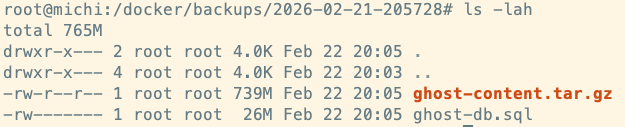
Edit inventory/group_vars/all/vars.yml and set
# Backup
backup_retention_days: 365
playbooks/backup-ghost.yml
---
- name: Backup Ghost
  hosts: all
  become: true
  become_user: root
  become_method: ansible.builtin.sudo

  vars:
    backup_dir: /docker/backups
    backup_timestamp: "{{ ansible_date_time.date }}-{{ ansible_date_time.hour }}{{ ansible_date_time.minute }}{{ ansible_date_time.second }}"
    ghost_content_dir: /docker/web/ghost/content
    mysql_container: web-ghost-db-1
    mysql_database: ghost
    mysql_user: "{{ ghost_db_user }}"
    mysql_password: "{{ ghost_db_password }}"


  tasks:

    - name: Create backup directory
      ansible.builtin.file:
        path: "{{ backup_dir }}/{{ backup_timestamp }}"
        state: directory
        mode: '0750'

    ##############################################################
    # MySQL backup

    - name: Dump Ghost MySQL database
      community.docker.docker_container_exec:
        container: "{{ mysql_container }}"
        command: >
          mysqldump -u {{ mysql_user }} -p{{ mysql_password }}
          --single-transaction
          --routines
          --triggers
          {{ mysql_database }}
      register: mysql_dump

    - name: Write MySQL dump to file
      ansible.builtin.copy:
        content: "{{ mysql_dump.stdout }}"
        dest: "{{ backup_dir }}/{{ backup_timestamp }}/ghost-db.sql"
        mode: '0600'

    ##############################################################
    # Ghost content backup

    - name: Archive Ghost content directory
      ansible.builtin.shell:
        cmd: >
          tar czf {{ backup_dir }}/{{ backup_timestamp }}/ghost-content.tar.gz
          -C {{ ghost_content_dir }} .
      changed_when: true

    ##############################################################
    # Cleanup old backups

    - name: Remove backups older than {{ backup_retention_days }} days
      ansible.builtin.find:
        paths: "{{ backup_dir }}"
        age: "{{ backup_retention_days }}d"
        file_type: directory
      register: old_backups

    - name: Delete old backup directories
      ansible.builtin.file:
        path: "{{ item.path }}"
        state: absent
      loop: "{{ old_backups.files }}"

    ##############################################################
    # Summary

    - name: List backup contents
      ansible.builtin.find:
        paths: "{{ backup_dir }}/{{ backup_timestamp }}"
      register: backup_files

    - name: Show backup summary
      ansible.builtin.debug:
        msg: "Backed up: {{ item.path }} ({{ (item.size / 1024 / 1024) | round(2) }} MB)"
      loop: "{{ backup_files.files }}"
Migrating from an existing Ghost setup in Docker
My setup required a host-to-host migration from dnsmichi.at to dnsmichi.com. Here are the steps in case they are helpful:
Create a backup from dnsmichi.at host
cd /docker/ghost

docker exec ghost-ghost-db-1 mysqldump -u root -p ghost > ghost_backup.sql

tar czf ghost_backup_sql.tar.gz ghost_backup.sql

tar czf ghost_content.tar.gz /docker/ghost/content
Download the tarballs with scp.
scp root@dnsmichi.at:/docker/ghost/ghost_backup_sql.tar.gz .

scp root@dnsmichi.at:/docker/ghost/ghost_content.tar.gz .
Modify the database backup and replace the old domain with the new domain.
tar xzf ghost_backup_sql.tar.gz

sed -i s,dnsmichi.at,dnsmichi.com,g ghost_backup.sql

rm ghost_backup_sql.tar.gz
tar czf ghost_backup_sql.tar.gz ghost_backup.sql
Upload the backup to the new host.
scp *.tar.gz michi@michi.fyi:/tmpOn the new host, import the backup. Important: Stop the Docker compose stack before moving files in place.
cd /docker/web

mv /tmp/ghost_* .

docker compose down

mkdir -p /docker/web/ghost

mv docker/ghost/content ghost/
Keep hosts down, and import the database next, start only this container. Match the host to docker ps .
docker compose up ghost-db -d

docker exec -i web-ghost-db-1 mysql -u root -p<password> ghost < /docker/web/ghost_backup.sql
Bring the all containers back up (Ghost server, Traefik)
docker compose up -dThe old setup used Ghost 5. Before upgrading, I took a Ghost backup with the new Ansible playbook, and modified the group_vars ghost_version to 6 then.
Transparency note: With a little help from AI
Claude greatly helped me learn Traefik, debug gateway timeouts and incorrect configuration, and optimize the Ansible setup.
Here are a few prompts with great outputs to iterate faster:
I'm configuring GHost with Traefik in Docker. It cannot find the database host.

Next one - ACME letsencrypt problems

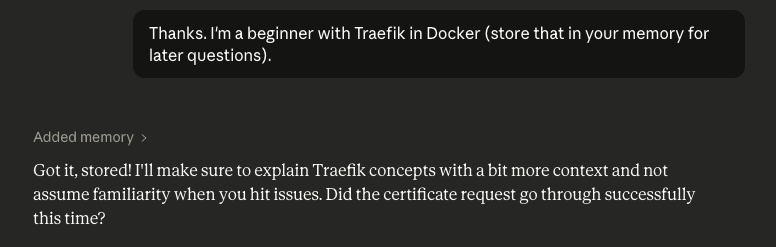
Thanks. I'm a beginner with Traefik in Docker (store that in your memory for later questions).

It works - now Traefik redirects to https and I see a gateway timeout error in browser and curl.

Now I need to add a placeholder page for michi.fyi as domain + TLS certificates. Probably best with Nginx as a container. What can you recommend using the current config?

I used the attached config. How to update the Ansible playbook too?

Works. Now comes the big part - I have an existing Ghost setup in Docker in production, and want to migrate everything to the new platform. I assume I need MySQL backups but also file upload storage. The Docker config looks exactly the same for Ghost, minus the Traefik labels (old setup used nginx automation)

Now for some Ghost updates ... I made the theme to "auto" and have a custom menu injection that still renders white on dark.

And I also need to configure this redirect into TRaefik with Letsencrypt for dnsmichi.dev

And finally, the old host keeps dnsmichi.at ... but should always redirect to dnsmichi.com, instead of running Ghost. Can you help me with a similar Nginx config?

Now for some Ansible and Ubuntu best practices ... which other things come to mind?

Does group_vars/all/vault.yml actually work?

Regarding latest image tag - should I changed that and pin it  for Traefik?

Should I use Ansible vars in host_vars to specify the tags and use them in the jinja templates?

Traefik question - I also want to use the Traefik dashboard, but with password auth. How would I modify docker compose/Ansible for that?

The final step is now to run run.sh in Ansible, right?

Can I force the run.sh behavior with the community module?

Last question on Ghost, promise. The TOC menu shows dark text on dark background.
Agentic Memory
Claude was also a little direct in conversations, assuming my knowledge.
That's exactly what the error is telling you: resolver exists, but no challenge method specified.So I used Agentic Memory for the first time: